The Artstation Store situation is fix!

General / 16 September 2024

Good news, everyone! The issues with my ArtStation store have been fixed! 🎉 You can now easily browse, purchase, and download all available assets without any hiccups.

Thank you for your patience, and feel free to check it out and let me know if you have any questions or feedback.

Cheers,Guillaume Lussier-Dulude

ArtStation Marketplace Access Lost – My Products is on Gumroad for Now!

General / 06 September 2024

Hello, Everyone!

If you’ve been following my work, you may have noticed a recent change regarding my ArtStation Marketplace. Unfortunately, due to issues with the trolley ID verification process, my account on the ArtStation Marketplace has been temporarily disabled. This has been an unexpected and frustrating hurdle.

What Happened?

ArtStation, has security measures in place to ensure a safe environment for both buyers and sellers. As part of this, they require ID verification through their third-party service called “Trolley.” For reasons still unclear, my verification process ran into complications, and as a result, I lost access to the marketplace feature on my account. Despite multiple attempts to reach out to their support team, I haven’t received any response for over two weeks now.

Rest assured, I’ve been working on resolving this issue and am doing everything I can to get back up and running on ArtStation. I appreciate your patience while this is sorted out.

Where Can You Find My Products Now?

In the meantime, my products are still available! You can continue to access and purchase them through Gumroad.

Check out my Gumroad page here!

Gumroad has been a reliable platform, and I’m excited to use it as a primary hub for my products until my ArtStation Marketplace is back online. I’ll also be offering the same quality and variety of content there, so you won’t miss out on anything.

Thank You for Your SupportI’ve been in the 3D art industry for over five years now, and my journey wouldn’t have been possible without the encouragement and feedback from supporters like you. 

Feel free to follow me on Gumroad to stay updated on new releases, and if you have any questions or concerns, don’t hesitate to reach out.

Thanks again for your ongoing support and understanding!

— Guillaume Lussier-Dulude

How To Organise Your Creative Brain With Eagle

Article / 23 October 2022

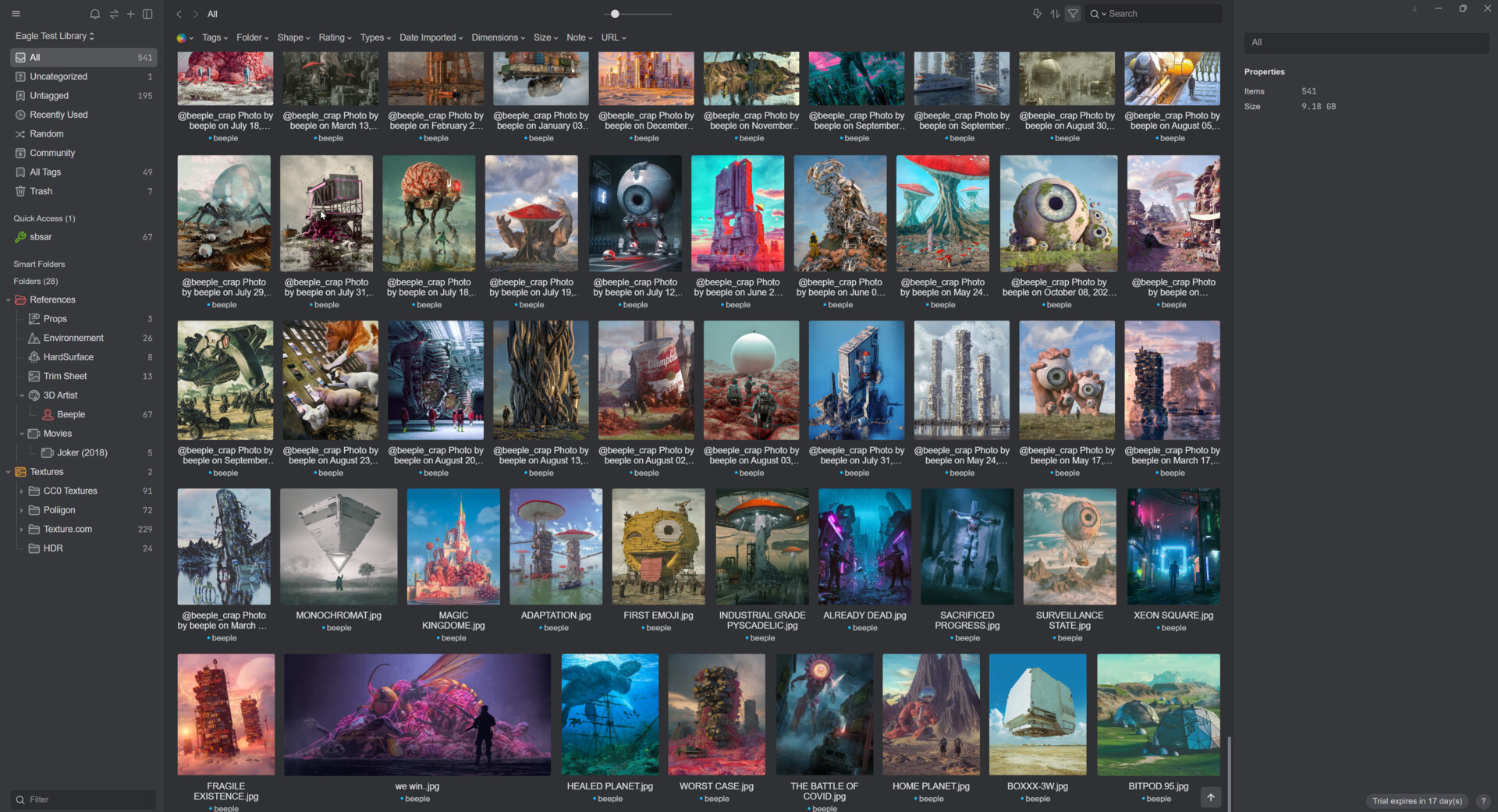
I discover a new app that can change the way to organize my reference and my image. As a 3D artist, it is important to have references to increase creativity or be accurate to help me to recreate the world in 3D. This software is called Eagle. It helps me to organize my reference photo, textures, HDR, etc. You can also use Eagle for other purposes than storing images. I know I could create a new library to use for important PDFs so it will be different from my main library.

You can organize many different formats like images, video, sound, affinity files, Adobe files, 3D objects, 3D format, HDR, etc. I see a lot of potential for me to help me to organize references. Also, the software contains very well to automatize tools for Organizing tags, Batch Processing, Removing duplicates, Smart folders, and Auto-Tagging. I also discover that you can create actions to make your life faster to do multiple tasks in one click and since I am lazy a little bit, I like it.

Here are All the Features of the Website

It is easily customizable for my need since it uses a tag system and a hierarchy folder. One tip I have with the tag system is I can organize the tag with different categories. I like using the tag to separate the reference that comes from a video game, movie, or other media. I also use the tag to separate the artist of my reference.

Use the comment mode that can be inside Eagle to show you all the information you can have for assets. It is the perfect thing to do annotation of your image and remember important areas.

Here is the type of thing you can link with your image

  1. Image Preview
  2. Colour palette
  3. Titles
  4. Tags
  5. Notes
  6. URL of the image on the web
  7. Folder location of the files

Proprieties of the image

One good feature of the software is you have a lot of ways to filter your files in your library. You can filter by color, tags,  folders, shape, rating, file types, date import, dimensions, size, note, and by URL. You have a very good range of selections.

If you right-click, you can reverse search the image on  Google, Yandex, Bing, and Tin-eye. It helps find an image you don't know where it comes from or find a similar image.

To conclude, I think that Eagle is a very good tool for my need as an artist since sometimes it could be very difficult to get your image or file in one place. Also, I feel it is easier than the online alternative Pinterest since it is straight to the point. No need to sign up. It was easier to move files to a different folder and it is way easier to find your reference. You have also a lot of automated tools that can be used to make my life easier on reduce my work while organizing my file.

This software is only 29$ USD and doesn't have any subscription option. You pay what you get and you have a software update forever. That's cool from the developer.

You can buy the software here.
Two new product

News / 26 April 2022

Today is the release of two new products on my platform of sales on Artstation. It's more than 110 alphas with a theme that contains Astec symbols from Mesopotamia and runic alphabets.

You can find here:

29 runic alphabets Alpha/Brushes  : https://www.artstation.com/a/15391091
81 Mesopotamia/Astec Symbols Alphas/Brushes : https://www.artstation.com/a/15232174

Thank you for everyone that already purchase my other brush. Stay tune, because I have more idea to come.

Thank You and Update!

Work In Progress / 08 May 2020

Hello everyone!
I would like to thank everyone who bought my brush pack during April and March. I have news for everyone. I added 26 new alphas brushes for free for those who already bought this pack.


I am planning this month to add more products, like a reference photo pack. I am also preparing a new blocking kit bash that will help simplify the work when you do environment 3D that are based on real life scale. My goal is to create a 3D scene that will not do the blocking each time. I will add vehicles, architectures, props, etc. This kit will help a lot when you have difficulty with the scaling of your scene.I will also include modular objects that are easy to manipulate. If you have any suggestions of different kinds of mesh that you want to be added in my kit, feel free to write down in the comment section.

I will also add a free procedural texture for grid test inside game engine.

Stay tune for updates and happy modelling!